

Chrome Portable
github.com/Tensionix/chrome-portable ↗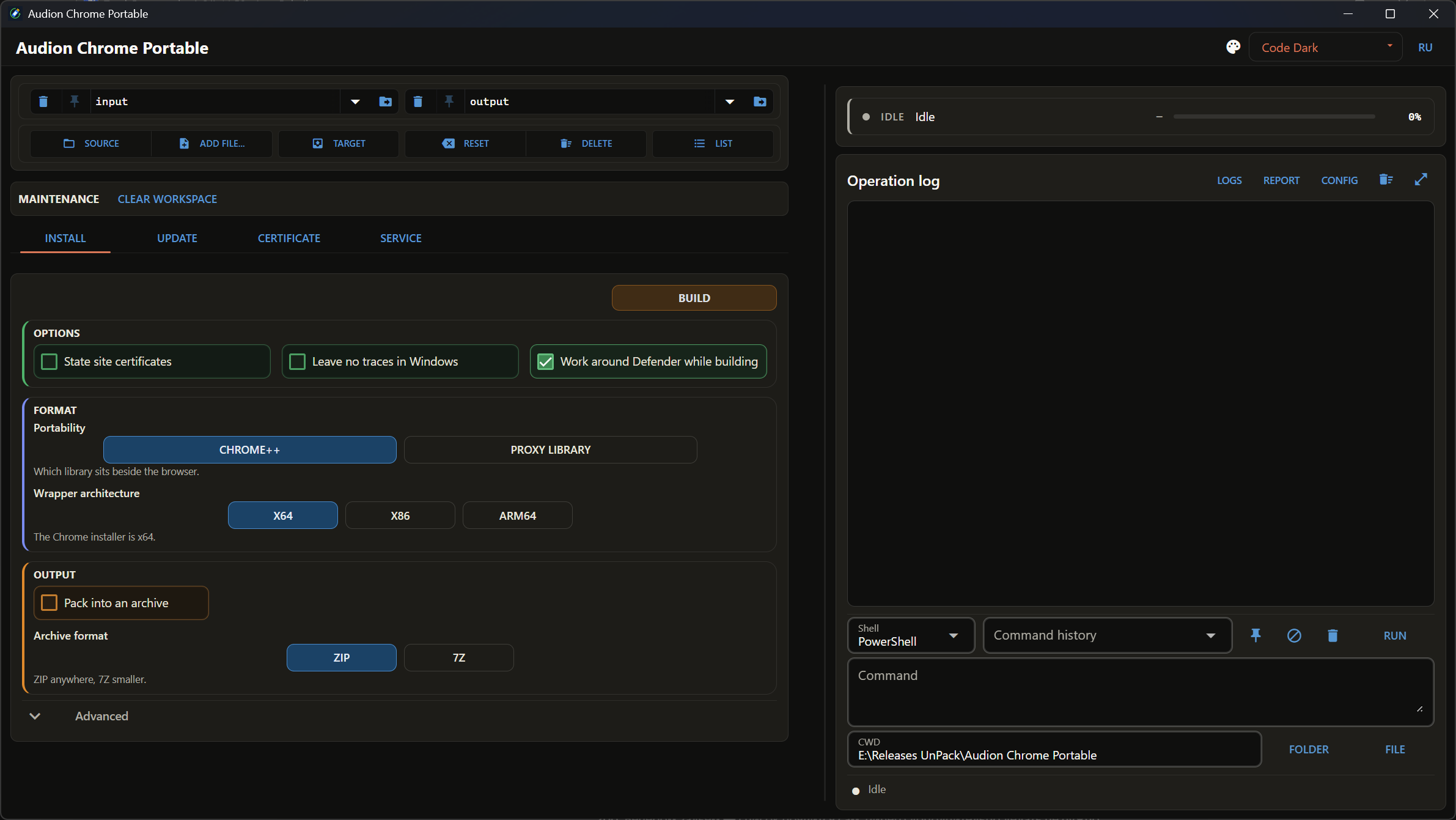
Selbst gebaut und — vor allem — mit einem Knopfdruck aktualisiert: verpackt ins Archiv, portabel gemacht über die zwei bekanntesten Werkzeuge dafür. Eine portable Chrome-Version gibt es nicht: Es gibt einen Installer und automatische Updates, aber keinen Ordner zum Mitnehmen. Dieses Programm baut ihn selbst, hält das Gebaute aktuell, pflegt Chrome++ und kann die russischen Stammzertifikate hineinlegen — damit Behördenseiten ohne Kunststücke mit dem Windows-Speicher öffnen. Sie brauchen mehrere Browser? Dann nehmen Sie Browsers Portable.
4 Downloads über GitHubAudion Chrome Portable
Contents
- Why It Exists
- What Is in the Build
- Certificates
- Chrome++
- Next
- Technical Reference
- The Window
- Updating
Builds a portable Google Chrome, keeps it updated, keeps Chrome++ current, and places the Russian state root certificates into the build.
Why It Exists
Google Chrome has no portable build at all — neither official nor a maintained third-party one. Yet the browser itself is perfectly portable: everything it needs sits beside the executable, and the only obstacle is an installer insistent on spreading it across the system.
The answer is simple: do not run the installer — unpack it.
ChromeStandaloneSetup64.exe (~120 MB)
└── Chrome.7z
└── Chrome-bin\ → <build>\App\
chrome.exeOut of a hundred and twenty megabytes of installer comes the thing it was built to deliver, placed into a build folder. Nothing is installed into Windows.
What Is in the Build
App\ the browser itself
Data\ the profile: bookmarks, extensions, settings
Certificates\ the state root certificates and two wrappers
Google Chrome Portable.cmd launcher
Portable-Build.json which versions are insideIt travels whole. The profile is inside — moving to another machine loses neither bookmarks nor extensions.
Certificates
Russian state portals issue certificates absent from the Windows store — and without them those sites will not open. The program places them into the build along with two wrappers: install and remove.
The second matters as much as the first. Installing a root certificate changes the system, and that change must be undoable in one action rather than by hunting through the certificate store.
Chrome++
The add-on the build's convenience rests on. The program keeps it current alongside the browser itself.
One thing is worth knowing about it: a build can fail during packing with a file access error — and that is neither the disk nor a corrupt archive, but the antivirus inspecting a freshly written executable. Covered in tools\CHROME_PLUS_AND_DEFENDER.md (Russian).
Next
- User Guide — step by step.
- Checklist — what is run before a release (Russian).
tools\CHROME_PLUS_AND_DEFENDER.md— Chrome++ and the antivirus.tools\DECISIONS_EN.md— decisions taken.
Technical Reference
The Window
Four switchable tabs. A command with its parameters unfolds on the tab itself: its own run button named after the action, with the parameters beside it — not in a separate settings dialog.
Updating
What the vendor released is compared against what is in the build. Only what changed is updated; the profile is left alone.
Das Programm ist portabel: der entpackte Ordner ist das installierte Programm. In die Registry wird nichts geschrieben; zum Entfernen den Ordner löschen.
$name = "Audion_Chrome_Portable_v1.0.1_Full.zip"
Invoke-WebRequest "https://audion.dev/get/chrome-portable/1.0.1/Audion_Chrome_Portable_v1.0.1_Full.zip" -OutFile $name
Invoke-WebRequest "https://audion.dev/get/chrome-portable/1.0.1/Audion_Chrome_Portable_v1.0.1_Full.zip.sha256" -OutFile "$name.sha256"
$want = (Get-Content "$name.sha256").Split(" ")[0]
$have = (Get-FileHash $name -Algorithm SHA256).Hash.ToLower()
if ($want -ne $have) { throw "Prüfsumme stimmt nicht: der Download ist beschädigt" }
Expand-Archive $name -DestinationPath ".\chrome-portable"