

Disk Tools
github.com/Tensionix/disk-tools ↗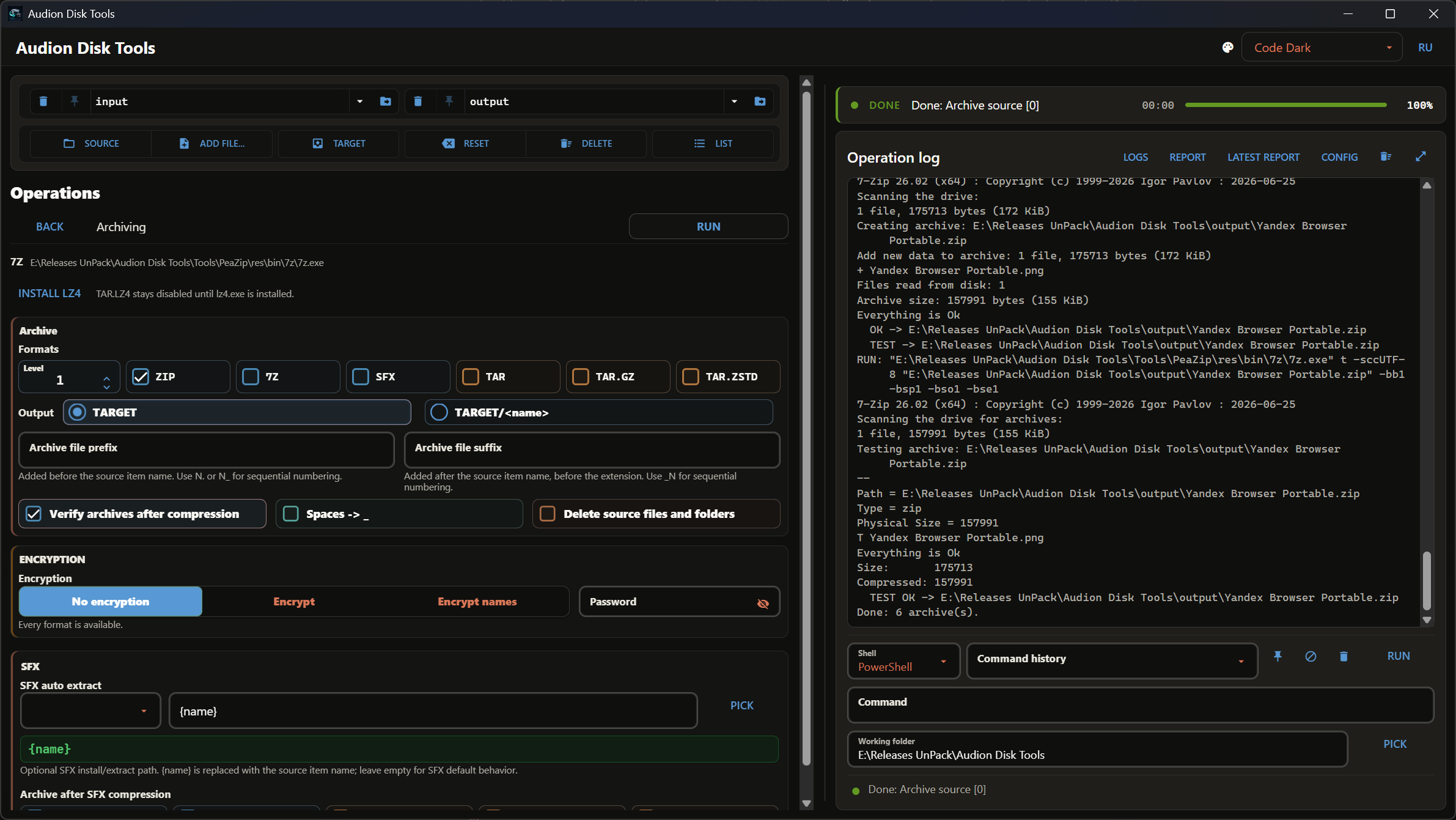
Ein Zwei-Fenster-Dateimanager im Geist von Total Commander, durch und durch portabel: eigene .NET-Laufzeit, der Archivierer PeaZip, RClone, der Editor Microsoft Edit und Windows Terminal liegen im selben Ordner. Anheftbare Tabs, Masken, die im Fenster nur Ordner mit passenden Dateien darin lassen, gespeicherte Fensterpaare, Windows-11-Glas und die Zeilenfarben von TC. Kopieren und Verschieben laufen über Robocopy oder RClone, auf Wunsch mit Prüfung jeder Kopie per BLAKE3. F11 ergänzt Neues, F12 erstellt eine genaue Kopie und zählt vorher, wie viel gelöscht wird; BISYNC hält Ordner, die auf zwei Rechnern bearbeitet werden, im Gleichklang. Ein Ordner lässt sich nicht in sich selbst kopieren, Verknüpfungen führen den Durchlauf nicht nach außen, STOPP hält wirklich an — jeder solche Fall ist durch eine Prüfung abgesichert, und ohne grüne Prüfungen erscheint kein Build. ZIP-, 7Z-, TAR.GZ-, TAR.ZSTD- und SFX-Archive mit einer Taste, Entpacken schlau oder jedes Archiv in einen eigenen Ordner. F4 öffnet die Datei in Edit, Strg+Enter öffnet ein Terminal im Ordner oder startet das Skript, Umschalt+Leertaste zeigt die genaue Größe in Bytes, die rechte Maustaste das Explorer-Menü.
22 Downloads über GitHubAudion Disk Tools
A two-panel file manager for Windows: tabs and drives as in Total Commander, mask filters, saved panels, robocopy copying with BLAKE3 verification, sync, packing and unpacking — in one window, with nothing to install.
Built on .NET 10 and Avalonia; everything it needs lives in the project folder: the program with its own runtime, the PeaZip archiver, rclone, the editors Microsoft Edit and micro and a portable Windows Terminal (all MIT).
Start
Start.exe in the root of the folder. Nothing to install: .NET, PeaZip and rclone travel with the program. The folder can be moved anywhere — the settings and the history of work live inside it, in config\.
What it does
- Two panels with tabs, drives, breadcrumbs and row colours by the file types of MASKS (the Audion Dark, Audion Code Dark, Audion Vault Dark — the interface in the colours of Audion DPI Manager, only the ground of the panels changes — and Audion Light themes).
- Mask filter per panel: shows only the files you need together with their folder structure; copying from a filtered panel takes only them.
- Saved panels: the folder and the marks of one or both panels — there and back in one click.
- Total Commander compatible: TC tabs files (
.tab, its "Save tabs to file") are imported and exported — the folders of the tabs, pins (the locked tabs of TC), captions, sorting, the active tab, one panel or both. Marks and mask filters are kept only in the program's own.json. - Copy and move (F5, F6) through robocopy: NTFS streams, creation and modification times, attributes, folders in 8 threads. Or rclone — switched in SETTINGS.
- COPY, MIRROR, BISYNC (F11, F12): add what is new, make an exact copy (it counts the deletions first), two-way sync.
- BLAKE3 check: after copying, source and copy are read again, the copy from disk past the cache; a move deletes the source only after a match.
- Packing (ALT+F5): ZIP, 7Z, SFX, TAR, TAR.GZ, TAR.ZSTD; compression, AES-256 encryption, name prefixes and suffixes with a number, layout, archive test after creation.
- Unpacking (ALT+F9) in batches: into the other panel or here, "smart" or each archive into its own folder; volumes and TAR inside GZ/ZSTD/XZ open on their own.
- Entering an archive by Enter: ZIP, 7Z, RAR, TAR, ISO and a TAR in GZ/BZ2/XZ/ZSTD open like a folder; F5 unpacks the marked objects into the other panel, Ctrl+A and F5 - the whole archive. Read-only inside.
- Explorer menu on the right button, Recycle Bin on F8, past it — SHIFT+DEL.
- Three interface languages: Russian, English, German — on the fly.
- COLORS: your own colours for the window, panels and file types, per theme; the list background is a gradient with film grain.
- A quick start and the tray: the Audion mark shows right after the click, the window before its lists. If you wish, the program minimizes to the tray, starts there and with Windows — SETTINGS · START AND TRAY.
- Updates: in the middle of the top line — the program, PeaZip and rclone with their versions and dots: green is the latest, light orange means GitHub has a newer one.
Project folders
| Folder | Contents |
|---|---|
Start.exe | starts the program |
App\ | the built program with its .NET runtime and data: translations, TC colours, mask groups |
Tools\ | PeaZip (only its archiving engines 7z and zstd with their licences) and rclone |
config\settings.json | the look and the choices: language, theme, fonts, colours, engine; survive the cleanup |
config\history\ | the history of work: tabs, saved panels, own masks, BISYNC pairs; removed by the cleanup |
._runtime\ | throwaway: operations log, GitHub's answer about versions, build stages |
Source\ | the program's source code |
Engine\ | build scripts: program, launcher, tools, verification |
Docs\ | documentation |
Building and release
The program in App\ is already built and ships as it is. It needs rebuilding only after a change in the code — that takes the .NET 10 SDK and is done on purpose.
builder_main.cmd:
[01] BUILD APP— the checks of[03]first, then a rebuild of the program intoApp\(needs the .NET 10 SDK); when a check fails,App\is left as it was;[02] START LAUNCHER— rebuildStart.exewith the program icon;[03] CHECKS— scenarios in which the program once lost or damaged data (audits of 24.09.2026): verified BLAKE3 moves, STOP, masks on both engines, overlapping paths, junctions, archives, settings, the installer. They run on throwaway files in the Windows temp folder with the real robocopy, rclone and PeaZip; the Recycle Bin is not used. The report goes to._runtime\tests\;[05] PEAZIP,[07] RCLONE— force a reinstall of a tool;[06] TOOLS IF NEWER— check PeaZip and rclone against GitHub and download only what is out of date or missing;[70] CLEAN CACHE— remove intermediate build files;[71] VERIFY— check that everything is in place and the versions agree; warns whenApp\was built before the latest change inSource\.
Before a release, [06], [70], [71] are enough.
cleanup_project.cmd removes the history of work (config\history), the throwaway files (._runtime) and build leftovers (Source\bin, Source\obj, Engine\Tests\bin, Engine\Tests\obj, tmp); the program, the tools and config\settings.json stay.
Author
Tensionix · tensionix.com · audion.dev
Das Programm ist portabel: der entpackte Ordner ist das installierte Programm. In die Registry wird nichts geschrieben; zum Entfernen den Ordner löschen.
$name = "Audion_Disk_Tools_v5.41.6_Full.zip"
Invoke-WebRequest "https://audion.dev/get/disk-tools/5.41.6/Audion_Disk_Tools_v5.41.6_Full.zip" -OutFile $name
Invoke-WebRequest "https://audion.dev/get/disk-tools/5.41.6/Audion_Disk_Tools_v5.41.6_Full.zip.sha256" -OutFile "$name.sha256"
$want = (Get-Content "$name.sha256").Split(" ")[0]
$have = (Get-FileHash $name -Algorithm SHA256).Hash.ToLower()
if ($want -ne $have) { throw "Prüfsumme stimmt nicht: der Download ist beschädigt" }
Expand-Archive $name -DestinationPath ".\disk-tools"