

Office OCR AI
github.com/Tensionix/office-ocr-ai ↗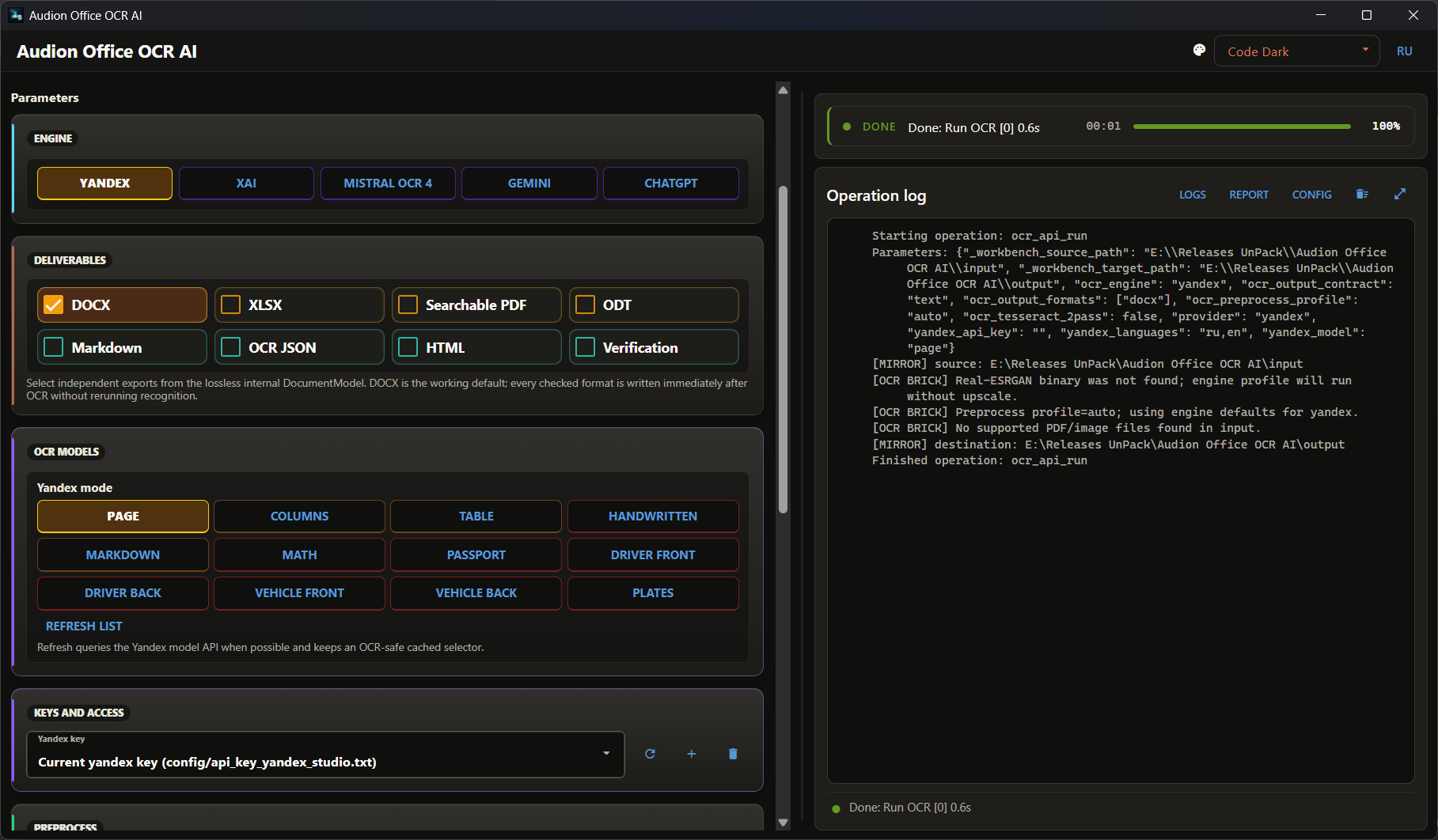
Der Versuch, die modernsten Werkzeuge zur Digitalisierung gescannter Dokumente an einem Ort zu bündeln. Ein Scan wird zu einem Dokumentmodell, das vom Erkennungsanbieter unabhängig ist; daraus lässt sich alles erzeugen — Text, Tabelle, PDF mit Textebene. Nichts verlässt den Rechner.
Audion Office OCR AI
Русский · User Guide · History
Contents
- Why It Exists
- What Is in the Package
- What Is Assembled From It
- Principles
- Next
- Technical Reference
- Source and Target
- Second Pass
- Full Archive
Recognising scans and converting office documents: from paper to an editable document, a spreadsheet, a searchable PDF, and everything else — from a single recognition pass.
Why It Exists
Recognition costs money and time. The usual workflow ignores that: you run a scan, get a Word file — and a week later you need the spreadsheet. So you run it again. Then you need a PDF with a text layer — once more.
Every pass means new money, a new queue, and a new result that may differ from the previous one.
Here the order is different:
sources → recognition → document package → review → any formatYou pay for recognition once. The result is stored in an independent <name>.document package, and every format afterwards is assembled from it locally — with no call to a paid service.
What Is in the Package
Not the text, but everything the text came from:
- an exact copy of the original;
- images of every page before and after preprocessing;
- hashes;
- the text and coordinates of all recognition candidates, not just the chosen
ones;
- reading order, tables, merged cells;
- confidence for every fragment;
- cross-checks between different engines;
- the provider's raw response;
- room for manual corrections.
Completeness here means no loss of source data, not a promise of flawless recognition. A recognition error is visible and fixable precisely because everything it was based on lies beside it.
What Is Assembled From It
Eight results, independently and at once: DOCX, XLSX, PDF with a text layer, ODT, Markdown, recognition JSON, HTML, and a review sheet.
By default only DOCX is produced — there are no format presets, nothing superfluous is generated. Reassembly runs locally; no third-party office suite is required. The maximum page size is A3.
Principles
The second pass by another engine is independent. It receives the same cleaned raster but does not see the first engine's text. So a disagreement between them means genuine ambiguity, rather than a hint repeated back.
Tables are parsed by a physical grid. For ruled tables a grid is built from the long lines of the raster, and the column count is verified against a 1…N numbering row taken from the coordinates of recognised words. Only then are the engines compared inside exact cells.
Merges are restored only in the header — there they are predictable. In the body of a table a merged cell more often means a parsing error than the author's intent.
Disagreements over digits are preserved. If the engines read a number differently, both readings stay in the package. A number is where a recognition error costs most, and a person should settle it.
Markdown is not the centre of the system. It is convenient as a control format and as input for language models, but the document package is not built around it.
PDF files are read and written by the PyMuPDF library, which is distributed under the GNU AGPL 3.0. The program's own code stays under Apache 2.0, but the build as a whole — the program together with PyMuPDF — is offered under the terms of the GNU AGPL 3.0; see the NOTICE file.
Next
- User Guide — step by step.
- History — what changed.
Technical Reference
Source and Target
The path rows are called Source and Target. The source may be a single file or a folder - picked, typed, or dropped on the window; the history of paths keeps pinned paths on top. Reset sets both back to the folders of the program, List names what lies in the source, the bin clears the source, the target or both into the Recycle Bin.
An external source is copied into the managed input folder before a run, and the results are copied into the chosen target. The window asks first when input or output hold anything - they are cleared before the copy.
Second Pass
| setting | what it does |
|---|---|
| none | the main engine only |
| Tesseract | local cross-check |
| Yandex | cloud cross-check |
| Yandex and Tesseract | both |
Full Archive
Packing the whole package into one archive remains an engine capability for compatibility, but it is not shown among the main buttons: it is rarely needed and takes a great deal of space.
Das Programm ist portabel: der entpackte Ordner ist das installierte Programm. In die Registry wird nichts geschrieben; zum Entfernen den Ordner löschen.
$name = "Audion_Office_OCR_AI_v2.0.0_Full.zip"
Invoke-WebRequest "https://audion.dev/get/office-ocr-ai/2.0.0/Audion_Office_OCR_AI_v2.0.0_Full.zip" -OutFile $name
Invoke-WebRequest "https://audion.dev/get/office-ocr-ai/2.0.0/Audion_Office_OCR_AI_v2.0.0_Full.zip.sha256" -OutFile "$name.sha256"
$want = (Get-Content "$name.sha256").Split(" ")[0]
$have = (Get-FileHash $name -Algorithm SHA256).Hash.ToLower()
if ($want -ne $have) { throw "Prüfsumme stimmt nicht: der Download ist beschädigt" }
Expand-Archive $name -DestinationPath ".\office-ocr-ai"