

Traffic Counter
github.com/Tensionix/traffic-counter ↗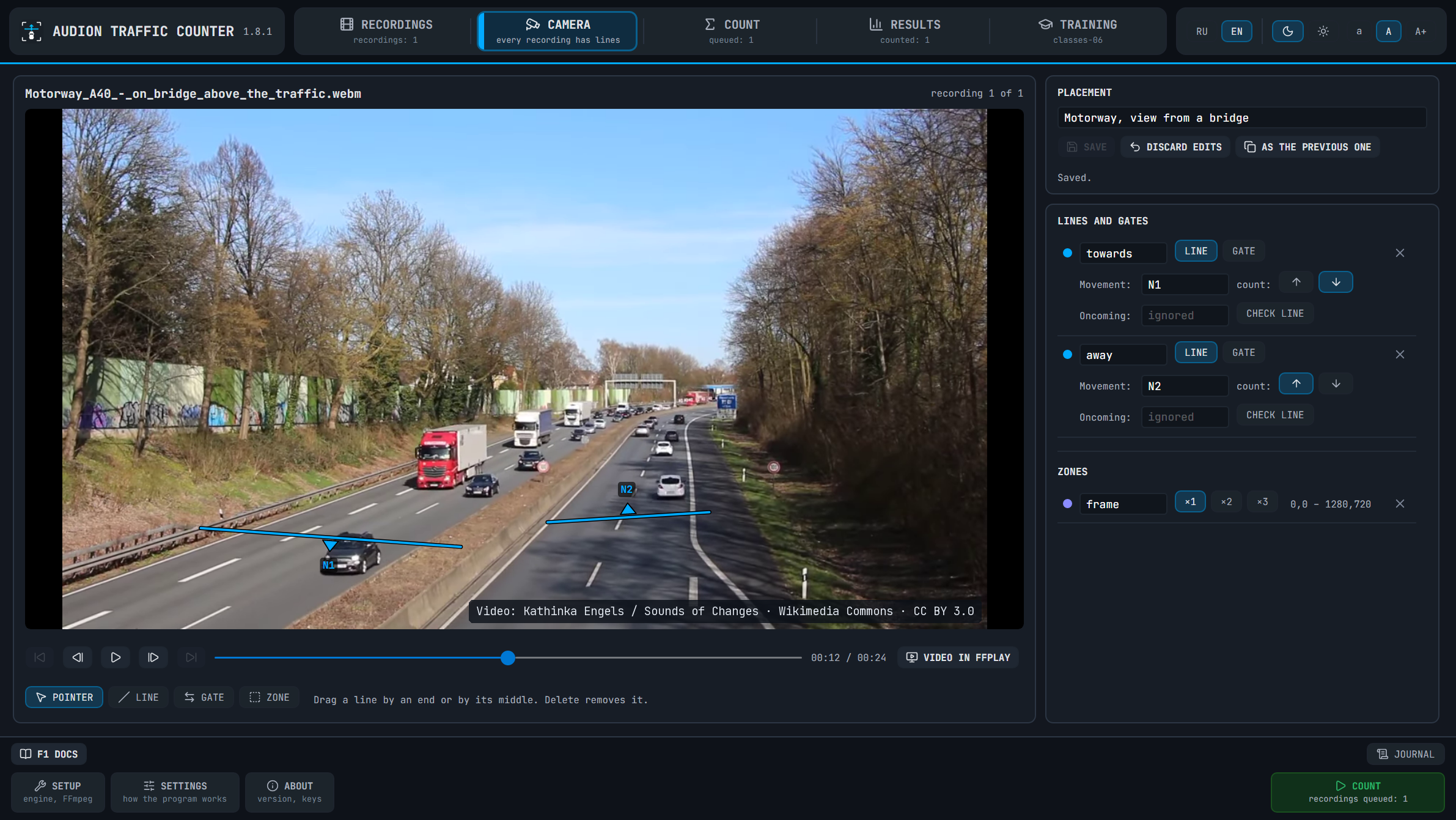
Eine Verkehrszählung bedeutet Stunden manuellen Zählens anhand von Aufnahmen. Hier setzt man Linien und Tore auf das Bild, und das Programm zählt selbst die Fahrzeuge jeder Klasse in jeder Richtung und schreibt das Ergebnis in eine Tabelle. Es können Hunderte Aufnahmen sein: einmal einrichten, und die Warteschlange wird über Nacht gezählt. Detektor YOLO26 und Tracker ByteTrack, Zählung auf einer NVIDIA-Grafikkarte, Ausweichweg DirectML.
1 Download über GitHubAudion Traffic Counter
Contents
- Why
- How it works
- What is inside
- Which recordings it takes
- Starting
- What is installed, and what the gigabytes buy
- With Claude and Codex
- What the program does not do
- What it is made of
Counts vehicles in recordings of ordinary cameras: how many cars, buses, trucks and motorcycles made each movement. Counting lines are drawn with the mouse right on the frame, recordings go into a queue, and the queue counts itself - all night if need be. The count runs on your machine: recordings are not sent anywhere.
Why
A traffic survey is hours of recording from every spot, which somebody watches again and counts by hand. The program does that count itself: a specialist draws the lines on the frame of each recording and comes back to finished tables.
It is made for what there is in practice: old low-resolution recordings from consumer cameras, tens and hundreds of files in a row.
How it works
- A line is drawn across the road and counts the vehicles that cross it along its arrow.
The arrow stands in the middle of the line and is turned round with one button.
- A gate is for an intersection and a roundabout: from the gates the program pairs the
entry and the exit of one vehicle into a manoeuvre "from where → to where".
- A zone enlarges the far part of the frame, where vehicles take a few pixels.
- Every recording has a placement of its own. The buttons under the video lead through the
recordings; the lines of the neighbouring recording are copied with one button.
- Every count is kept as a run of its own: runs of different models stand in one table,
beside the manual count when there is one.
What is inside
| Section | What it does |
|---|---|
| RECORDINGS | The list of videos: add files or a folder, mark what to count. The files stay where they are |
| CAMERA | The video with lines, gates and zones over it; going through the recordings; FFplay with the lines |
| COUNT | The model (YOLO26N … YOLO26X), what to count on, how many recordings at once, the queue, a trial run, the count as it goes |
| RESULTS | The history of runs, the table by movement and class with the total of vehicles, runs side by side, the check against a manual count, and the report of all recordings as Word and Excel files |
| TRAINING | The model of kinds (cars, trucks, buses): one comes with the program and is on from the start, your own can be taught for your cameras; and the pictures of disputed vehicles, whose kind is set by one button |
| SETUP | The video cards of the machine and a button that installs exactly what it lacks |
| SETTINGS | How the program itself works: the speed of the count (recordings at once, threads, priority) and where the project file with the lines of the recordings is kept |
Which recordings it takes
Files .avi, .mp4, .mov, .mkv, .mts, .m2ts, .mpg, .wmv, .ts, .webm with the usual codecs: H.264, H.265, AV1, MJPEG, MPEG-2, MPEG-4. Files with other extensions do not get into the list. The program was checked on an MJPEG AVI recording of 640x480, AV1 on a short test clip; the other formats are read by the same libraries but were not tried on recordings. An interlaced recording (DV 720x576) has to be made progressive before it is counted.
Starting
Start Start.exe, open the SETUP section and press INSTALL WHAT IS NEEDED: the program says what it will download for your machine and asks, then puts its own Python, PyTorch for your video card, TensorRT for an RTX card, the detection library and FFmpeg into its own folder. The one thing that goes into Windows is the Microsoft Visual C++ Redistributable PyTorch needs, when it is not there. Then follow the user guide.
The main way to count is an NVIDIA video card of the RTX series through TensorRT: a half-hour recording of 640x480 takes about five minutes on an RTX 5070. An NVIDIA GTX card counts through PyTorch (CUDA), several times slower. Without NVIDIA the program counts through DirectML on any DirectX 12 video card, slower still.
What is installed, and what the gigabytes buy
Every machine gets the program's own Python, the detection library, the weights of the model (20 MB) and FFmpeg (about 0.7 GB). The rest follows the video card:
| No NVIDIA card | NVIDIA GTX | NVIDIA RTX | |
|---|---|---|---|
| How it counts | DirectML, on any DirectX 12 video card | PyTorch with CUDA | TensorRT over PyTorch with CUDA |
| What is installed for it | PyTorch for the processor and DirectML | PyTorch with CUDA, about 3 GB of download | PyTorch with CUDA and TensorRT, 3 GB of download each |
| Disk space | about 5 GB | not measured | about 15 GB during the installation, 11.5 GB after it |
| A half-hour recording of 640x480 | about an hour and a half | 24 minutes (see below) | 5 minutes |
| The queue | recordings one by one | - | four recordings at once: two hundred half-hour recordings in about 12 hours |
| Teaching the model of vehicle kinds, 25 epochs on 3500 crops | half an hour | not measured | 5.6 minutes |
The times are the author's. The column without NVIDIA is a laptop with integrated Intel graphics (the count) and its processor (the teaching); the RTX column is an RTX 5070. The program was not run on a GTX card: the 24 minutes of its column are the same way of counting, PyTorch with CUDA without TensorRT, measured on the RTX 5070 - a GTX card is weaker and takes longer. An NVIDIA card older than the GTX 10 series is treated as no NVIDIA card: this PyTorch does not count on it, and the count goes through DirectML.
Where the size comes from. On a machine with an RTX card, of the 11.5 GB: PyTorch with CUDA is 7 GB (NVIDIA's libraries for computing on a video card are inside it), TensorRT is 3.3 GB, FFmpeg 0.7 GB, and the rest is Python, the detection library and the models. Without an NVIDIA card PyTorch for the processor, about 3 GB, stands in place of the first two. The downloaded installation files - about 3.5 GB more on a machine with an RTX card - are removed once everything is installed.
What it is for. TensorRT builds the model into one engine for your video card - about a minute at the first count of each model - and counts 4.7 times faster than PyTorch with CUDA on the same card: 140 frames a second against 30. The numbers of the count hardly depend on the way: between TensorRT, CUDA and DirectML they differ by single vehicles.
With Claude and Codex
The program can be worked on together with an AI agent - Claude Code or Codex. The guide for the agent is Docs\AI_AGENT_GUIDE_EN.md. Open the program's folder in the agent, ask it to read that guide - and it places the lines from a frame of each recording, counts a recording, lays disputed vehicles out on sheets and teaches a model of kinds for your camera angles: it cuts the pictures, labels them, teaches and checks on vehicles the model has not seen. How it goes and what the agent sees on the way - in the user guide.
What the program does not do
It collects and sends no data; it goes to the network only for the installation and the model weights. It installs nothing into the system: everything lives in its folder. It does not read number plates. It does not split trucks by the number of axles: the classes are car, bus, truck, motorcycle.
Accuracy depends on the size of a vehicle in the frame: near the camera the count agrees with a manual one within one or two percent; far away some vehicles are lost, and the smallest are not seen at all. Cars are told from the rest exactly, buses and trucks roughly.
What it is made of
The window is C# on Avalonia 12 (.NET 10). The counting engine is Python: Ultralytics YOLO and the ByteTrack tracker, PyTorch, TensorRT, ONNX Runtime with DirectML, OpenCV; FFmpeg reads the video. Icons are Lucide, fonts are JetBrains Mono and Inter. Third-party programs and libraries are downloaded by your button and keep their own licences.
The screenshot of the window shows a frame of a free video, not a customer's recording: "Motorway A40: on bridge above the traffic" by Kathinka Engels (Sounds of Changes), from Wikimedia Commons, CC BY 3.0.
Das Programm ist portabel: der entpackte Ordner ist das installierte Programm. In die Registry wird nichts geschrieben; zum Entfernen den Ordner löschen.
$name = "Audion_Traffic_Counter_v1.8.1_Full.zip"
Invoke-WebRequest "https://audion.dev/get/traffic-counter/1.8.1/Audion_Traffic_Counter_v1.8.1_Full.zip" -OutFile $name
Invoke-WebRequest "https://audion.dev/get/traffic-counter/1.8.1/Audion_Traffic_Counter_v1.8.1_Full.zip.sha256" -OutFile "$name.sha256"
$want = (Get-Content "$name.sha256").Split(" ")[0]
$have = (Get-FileHash $name -Algorithm SHA256).Hash.ToLower()
if ($want -ne $have) { throw "Prüfsumme stimmt nicht: der Download ist beschädigt" }
Expand-Archive $name -DestinationPath ".\traffic-counter"