

Voice Tools
github.com/Tensionix/voice-tools ↗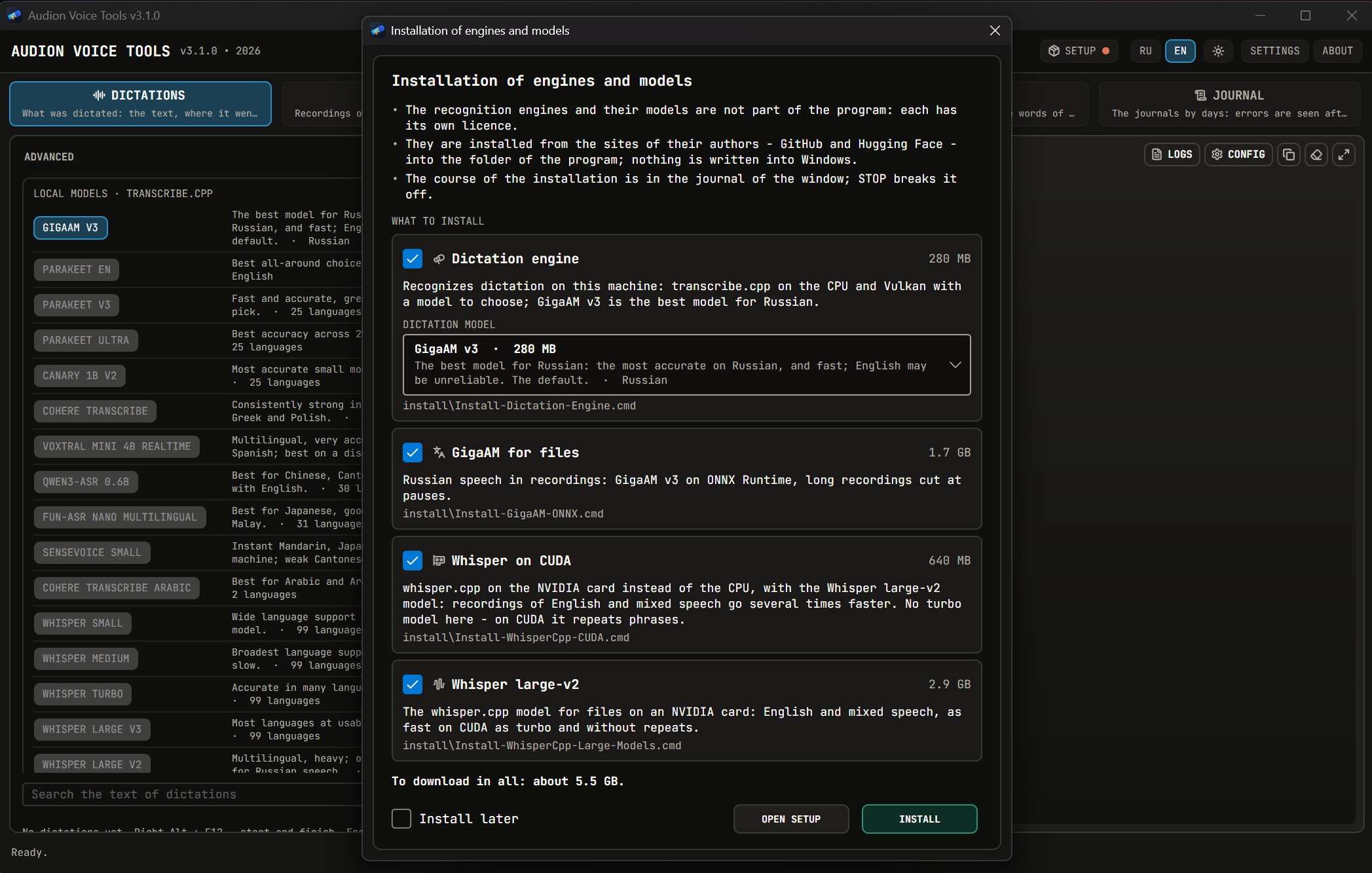
Hotkey drücken und sprechen - der Text landet dort, wo der Cursor steht, und die Zwischenablage kommt unverändert zurück. Aufnahmen von Besprechungen und Videos von der Festplatte werden zu Text, Untertiteln und einem Besprechungsprotokoll neben der Quelle. GigaAM erkennt die Sprache auf diesem Rechner - ohne Netz und ohne Schlüssel - oder die Cloud mit eigenem Schlüssel: xAI, OpenAI, ElevenLabs. Die Aufnahme wird sofort auf die Festplatte geschrieben, und ohne Not verlässt nichts den Rechner.
Audion Voice Tools
Contents
- Why It Exists
- What It Can Do
- What Has to Be Installed Separately
- The Principle
- Where Things Are
- Next
- Technical Reference
- FFmpeg and the NVIDIA Driver
- Portability
Dictation into any window and transcription of recordings — one program for Windows. Press the hotkey, speak — the text lands where the cursor is. Recordings of meetings and videos from disk become text, subtitles and the minutes of the meeting next to the source.
Why It Exists
Speech recognition is needed in two different situations.
Quick and now. Dictate a message, a letter, a task — and go on working at once. What matters is the response and that the program stays out of the way: a capsule at the top of the screen, a hotkey, the text at the cursor, the clipboard given back as it was.
A lot and for long. An hour-long meeting, a recording of a whole day, a folder of videos. What matters more is that nothing gets lost and nothing leaves the machine without need: the recording is written to disk at once, recognized on this machine, and the text lies next to the source.
What It Can Do
- Dictation — Right Alt + F12 starts and stops, Esc cancels. The capsule shows the level, the time and the last
words. A local model recognizes on this machine — GigaAM v3 for Russian by default, Parakeet and Whisper to choose from — no network, no key — or a cloud with your own key: xAI, OpenAI, ElevenLabs.
- Text modes — the ⌄ button of the capsule: Original text, Magic, Lightly, Thoroughly, As a list, Structured,
Minutes of the meeting. A language model shapes the text after the stop, before the paste: GPT-6 Luna by default, or xAI, or an own server; the models come from the list of the service itself.
- Dictionary — a section of its own, an entry a row: terms, abbreviations, shortenings and units as they are
written; replacements «said -> written».
- Dictation history — by days, with search: copy, listen, recognize again, download the sound, paste again.
- Recorder — Right Alt + F11: a recording from the microphone into the library, pause, recovery after a crash,
transcription right after the stop.
- Minutes of a meeting — from the transcript of a recording: subject, gist, decisions, tasks with owners and dates,
open questions.
- Files — recordings and videos from disk: GigaAM for Russian speech, Whisper for English and mixed speech, speaker
separation; MD, TXT, SRT, VTT and JSON next to the source.
- SETUP — components with download and visible progress, service keys with a check, a microphone check.
What Has to Be Installed Separately
Engines and models are not part of the download: each has its own licence, and they are installed from their authors' sites into the program folder.
On the first start the window offers what is recommended for this machine: the dictation engine, FFmpeg, GigaAM and Whisper for files — without an NVIDIA card about 3.7 GB in all. "Later" postpones the question; everything is also in SETUP, which shows what is installed and how much is to be downloaded.
Whisper depends on the video card. Without NVIDIA it is the turbo model on the CPU: of the Whisper models it is the only one a processor can carry. With an NVIDIA card Whisper for files is Whisper on CUDA with the large-v2 model, and the first start offers about 5.6 GB in all. Turbo is not downloaded on such a machine: on CUDA it repeats phrases — over five minutes of English speech one phrase came 25 times in a row and 42 % of the words were wrong — while large-v2 is as fast there (five minutes in 18 seconds) and gets 7 % of the words wrong. A turbo left from the CPU goes to the Recycle Bin when Whisper on CUDA is installed.
With an NVIDIA card SETUP also offers the heavy part — optional: GigaAM on CUDA, speaker separation on the video card (Community-1, a Hugging Face key is needed).
The Principle
The window never waits. The microphone, recognition, the paste, the cloud and the model of a mode run on their own threads; the window and the capsule only show what is going on.
Nothing gets lost. The cloud did not answer — GigaAM on this machine recognizes the same take. The model of a mode did not answer or answered with something else — the text of the engine is pasted. A cancelled dictation keeps its sound, a recording is recovered after a crash. Every such case is marked in the history.
Where Things Are
| Folder | What is there |
|---|---|
library\ | the library: dictations and recordings (library.sqlite3), recordings in recordings\YEAR\MONTH\ with their transcripts |
config\ | settings: dictation (dictation.json), dictionary (dictionary.txt), window (window_settings.json), files (app_settings.yaml); service keys — api_key_*.txt |
logs\ | logs by days |
Tools\, models\ | engines and models installed from SETUP |
Next
- User Guide — dictation, modes, dictionary, recordings, files, SETUP step by step.
Technical Reference
FFmpeg and the NVIDIA Driver
Every FFmpeg build is compiled against a particular version of the hardware-encoding headers, and each demands its own minimum driver. The newest build on an old driver does not accelerate anything — it breaks the hardware path. So the build is chosen to match the driver, not by version number.
| NVIDIA driver | FFmpeg the program installs |
|---|---|
| no NVIDIA card | the newest stable Gyan build, 9.0.2 at least |
| 610.88 (LTS) and newer | the newest stable Gyan build, 9.0.2 at least |
| 570.0 – 610.87 | 8.0.1 — not every operation is possible |
| 551.76 – 569.xx | 7.1 — not every operation is possible |
| below 551.76 | none: the installer stops and says why |
610.88 is the LTS driver the programs are built for. When 9.1 is out, 9.1 is installed; if a new build fails the NVENC test on the driver, the installer goes back to 9.0.2. Below 610.88 an older branch is installed so that NVENC works, and the installer says that not every operation is possible. The build is picked at installation: when the driver changes, FFmpeg installed again is picked for it.
Portability
The program lives in its folder: nothing is written into Windows, no installation is needed. The window is App\AudionVoiceTools.exe with its own .NET runtime, started by Start.exe. Files are transcribed by the console command voice_cli.cmd on the Python of runtime\ in the same folder.
Das Programm ist portabel: der entpackte Ordner ist das installierte Programm. In die Registry wird nichts geschrieben; zum Entfernen den Ordner löschen.
$name = "Audion_Voice_Tools_v3.1.0_Full.zip"
Invoke-WebRequest "https://audion.dev/get/voice-tools/3.1.0/Audion_Voice_Tools_v3.1.0_Full.zip" -OutFile $name
Invoke-WebRequest "https://audion.dev/get/voice-tools/3.1.0/Audion_Voice_Tools_v3.1.0_Full.zip.sha256" -OutFile "$name.sha256"
$want = (Get-Content "$name.sha256").Split(" ")[0]
$have = (Get-FileHash $name -Algorithm SHA256).Hash.ToLower()
if ($want -ne $have) { throw "Prüfsumme stimmt nicht: der Download ist beschädigt" }
Expand-Archive $name -DestinationPath ".\voice-tools"