

Browsers Portable
github.com/Tensionix/browsers-portable ↗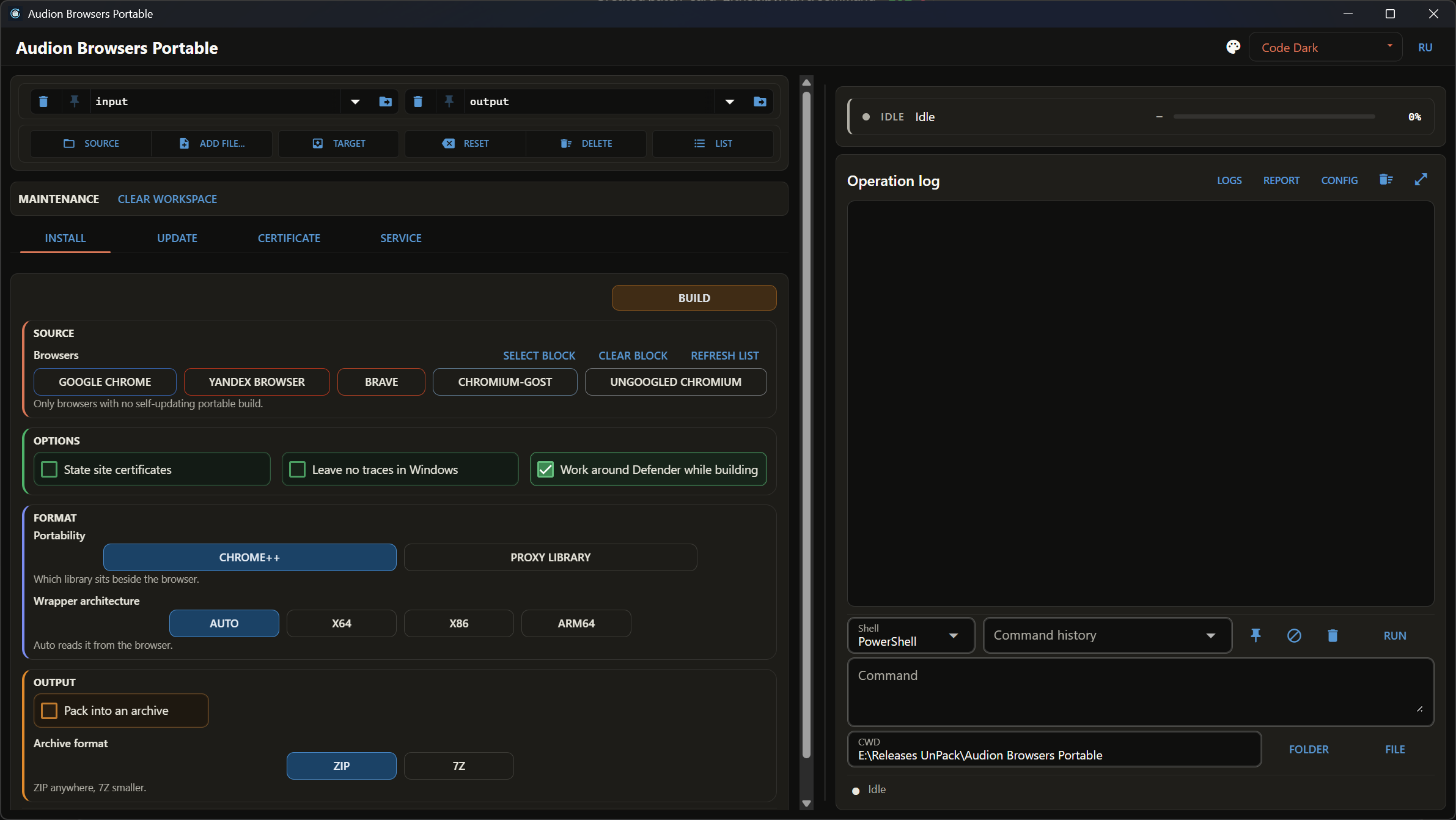
A browser gets in here by one rule: its developer has no portable build that updates itself. Vivaldi and Cent are left out for exactly that reason — they already have one. The program downloads, unpacks and assembles a browser, then keeps it updated: nothing is installed into Windows, installers are taken apart rather than run. Chromium-Gost earns its place separately — it speaks GOST TLS, which Russian government portals require. Use Chrome only? Chrome Portable is simpler — the same thing for a single browser.
Audion Browsers Portable
Contents
- Portable libraries
- Single-browser tools consolidated
- Why It Exists
- Official Downloads
- Who Is on the DLL Build List, and Why
- Running
- Next
- Technical Reference
- What You Get
- Updating
- The Antivirus False Alarm
One engine for the whole Chromium stack: downloads, unpacks, assembles portable browsers, and keeps them updated.
Portable libraries
The default library is Proxy library (x86/x64), with every optional switch in App/version.ini set to 0. Alternatives are Chrome++ (DeftKing) and Vivaldi++, both supporting x86/x64/ARM64. A failed release lookup or download falls back to the archive of the selected library kept from an earlier download (in Portable\_archives of the Target folder), verified again. The generated launcher starts in App so relative Data and Cache paths stay inside the build. Registry cleanup applies only to Chrome++.
Single-browser tools consolidated
UPDATE → UPDATE DLL ONLY refreshes the selected library in existing builds without downloading the browser. Browser files, Data and Cache stay in place. The same library keeps its INI; switching libraries creates the standard INI, with all optional switches set to zero for Proxy library.
Build, check and update forms have optional Chrome/Yandex full-installer URLs under Advanced. Blank fields use official sources. Custom installers are downloaded afresh during build and update.
Disable Yandex updater is enabled by default and removes only service_update.exe inside Yandex's App. Update the browser through this program afterwards.
CERTIFICATE → ADD TO BUILD saves the two Russian Trusted CA certificates and install/revoke commands in an existing build. Installing Windows trust remains a separate command.
Why It Exists
A portable browser is wanted for two reasons: it leaves the system alone and it travels as a folder. But half the browsers have no portable build at all, and the other half have one that never updates. Building it by hand is possible; updating it by hand every three weeks is not.
Nothing is installed into Windows. The installer is not run but unpacked: what it intended to place into the system is taken out of it instead. The profile lives in the build folder, next to the browser.
Official Downloads
The Downloads section saves original files under Browser Downloads in the Target folder: Cent Browser portable SFX (x86/x64), LibreWolf portable ZIP (x64/ARM64), Vivaldi installer (x86/x64/ARM64), and the regular DuckDuckGo installer (x64). For Vivaldi, manually choose Advanced → Install Standalone in the saved installer. The program does not run or unpack these files or replace their DLLs.
Repeat downloads verify the saved SHA256; DuckDuckGo's unversioned installer is downloaded to a temporary file and replaces the saved copy only when its hash changes. A source failure is reported for that browser while the remaining downloads continue. Zen is omitted because its current official Windows release has no portable package (checked 2026-10-01).
Who Is on the DLL Build List, and Why
One rule decides for the DLL builder: the vendor has no portable build that updates itself.
| browser | why it is here |
|---|---|
| Google Chrome | no portable build at all |
| Yandex Browser | no portable build, and the Russian state root certificates are already embedded |
| Brave | third-party builds exist, none of them update |
| Chromium-Gost | speaks the GOST TLS that state portals require; an archive exists, updates do not |
| Ungoogled Chromium | an archive exists, an updater does not — that is the point of the project |
Excluded from the DLL builder:
- Vivaldi — an official standalone install with working auto-update;
- Cent Browser — an official portable build with a built-in updater;
- Opera — no separate portable file, but auto-update packages ship beside the
installer, so it can update itself;
- Thorium — tried and dropped: the main repository publishes releases without
files, the fork builds 32-bit only, and the extension store does not work there — an ordinary ad blocker cannot be installed.
The logic is simple: if a browser can update itself, wrapping it means taking on work the vendor already does — and doing it worse.
Running
Start.exe opens the window. Every operation can also be run from a console, with the same settings, through browsers_cli.cmd — see the User Guide.
Next
- User Guide — step by step.
- Checks — what is run before a release (Russian).
tools\CHROME_PLUS_AND_DEFENDER.md— Chrome++ and the antivirus false positive
during builds (Russian).
tools\DECISIONS_EN.md— decisions taken.
Technical Reference
What You Get
A build folder: the browser, the profile, a launcher, and a record of which versions are inside. It travels as a folder. With zero INI switches, registry writes and optional restrictions remain under browser control.
Updating
The engine compares what the vendor has released against what is in the build and updates only what changed. The profile is left alone.
The Antivirus False Alarm
A build can fail during packing with a file access error — this is neither the disk nor a corrupt archive, but the antivirus inspecting a freshly written executable. Covered in tools\CHROME_PLUS_AND_DEFENDER.md.
The program is portable: the unpacked folder is the installed program. Nothing is written to the registry; to uninstall, delete the folder.
$name = "Audion_Browsers_Portable_v2.0.2_Full.zip"
Invoke-WebRequest "https://audion.dev/get/browsers-portable/2.0.2/Audion_Browsers_Portable_v2.0.2_Full.zip" -OutFile $name
Invoke-WebRequest "https://audion.dev/get/browsers-portable/2.0.2/Audion_Browsers_Portable_v2.0.2_Full.zip.sha256" -OutFile "$name.sha256"
$want = (Get-Content "$name.sha256").Split(" ")[0]
$have = (Get-FileHash $name -Algorithm SHA256).Hash.ToLower()
if ($want -ne $have) { throw "checksum mismatch: the download is corrupt" }
Expand-Archive $name -DestinationPath ".\browsers-portable"