

TC Updater
github.com/Tensionix/tc-updater ↗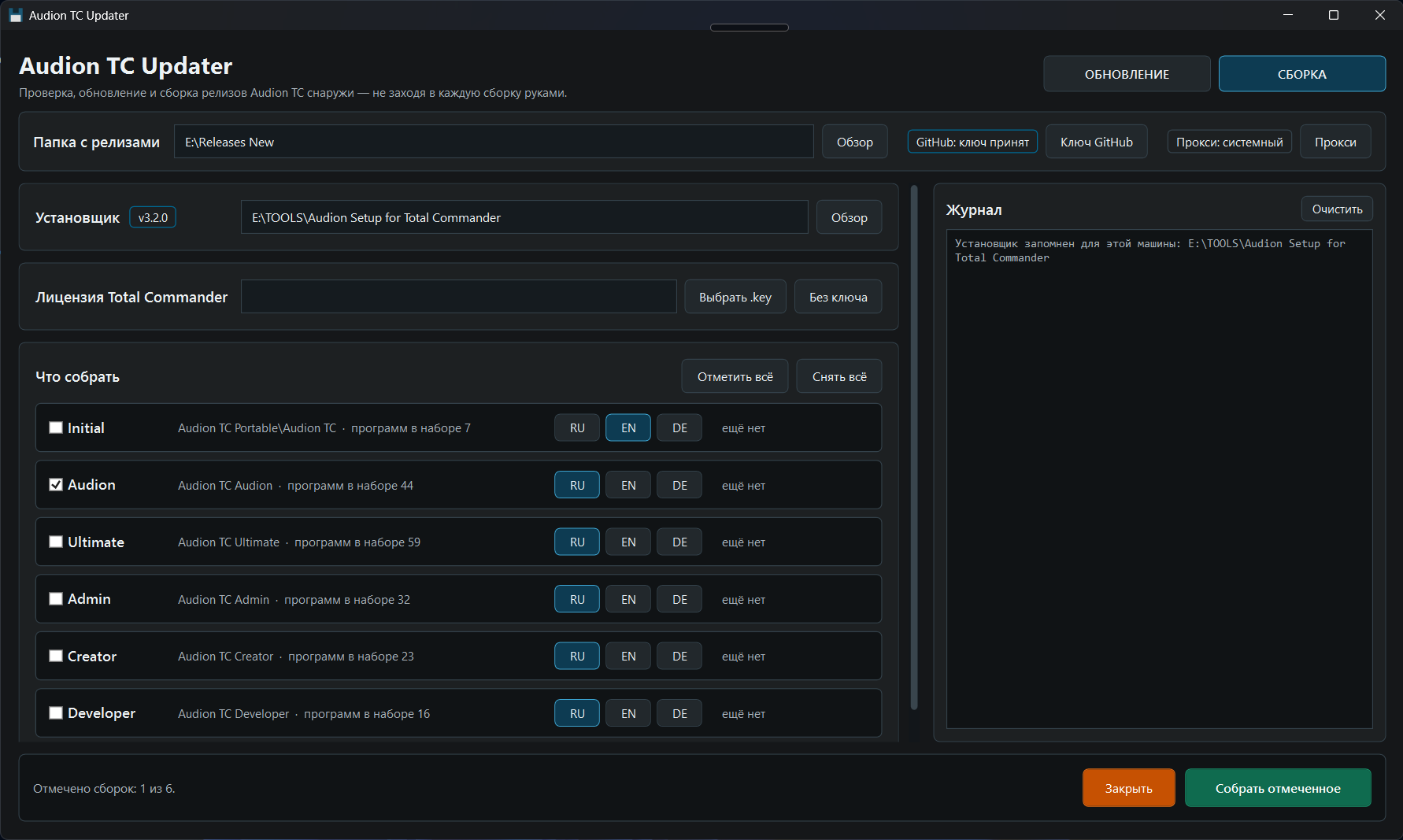
Checks, updates and rebuilds Audion TC release builds without opening each one by hand. A window shows the log and the plan across its UPDATE and BUILD sections; three files — Check, Update, Build — do the same without a window: drop a releases folder and confirm. A rebuilt edition replaces the previous one only when it built in full.
0 downloads from GitHubAudion TC Updater
Contents
- The window
- Three files without the window
- Which builds are taken
- UPDATE
- BUILD
- Licence
- GitHub key
- Fingerprints instead of versions
- The proxy
- Settings
Checks, updates and rebuilds Audion TC release builds from scratch - from the outside, without going into each one by hand.
The window
Start.exe opens the window. At the top are the releases folder and the section switch UPDATE | BUILD; the log runs down the right side at full height - on a 16:9 screen height is what runs out first.
Beside the section switch stands the pair RU | EN - the language of the window. By default the window and the three files without a window speak English, whatever the language of Windows. The pair changes captions, tooltips and the language in which the check, the update and the build write; the choice is remembered in ._runtime\ui-lang.txt and holds until it is changed again. Lines already printed into the log stay as they were, and what Windows and other programs write does not depend on the choice. While work is going on the language cannot be switched: halfway through it would break the report.
On the first start the window asks what to work with on this machine: the releases folder, the installer and the GitHub key. Only the releases folder is required: without the installer the BUILD section waits, without the key GitHub allows 60 requests an hour. An installer lying inside the chosen releases folder is filled in by itself.
While a check, an update or a build is going on, a bar runs at the bottom and a line says what is happening, for how long and at which step - "Checking · 0:04 · Asking the sources…". It is refreshed four times a second together with the log, so it is plain that the program is alive rather than stuck.
The window starts with a check, and a check changes nothing. For another releases folder use Browse or type the path into the field: it is taken on Enter or when you leave the field, and the next start opens on it.
Three files without the window
| File | What it does | What it changes |
|---|---|---|
Check-Releases.cmd | shows what is out of date in the builds | nothing - not a byte is written into the builds |
Update-Releases.cmd | shows a plan, asks, then updates | programs inside the builds, their buttons, menus and atlas |
Build-Releases.cmd | shows a plan, asks, then builds every variant on the list from scratch | a build takes the place of the previous one only when it installed completely |
Run them with a double click; they take the folders chosen at the first start. To work with another releases folder, drop it on the file. Until the first start has happened, the files ask to open Start.exe or to drop a folder.
Which builds are taken
Any Audion TC… folder in the releases folder: Initial, Audion, Ultimate, Creator, Developer, Admin - as many as there are. A container such as Audion TC Portable\Audion TC is found too. A build is a folder holding TOTALCMD64.EXE.
UPDATE
The check shows a table: programs in rows, builds in columns. A cell holds the version in the build, the author's version and an "update" tick. A click on a program ticks its whole row, a click on a build - its whole column.
Below the table:
- current - which programs are up to date, per build;
- source version unknown - the author's site does not name the version until the
file is downloaded (FastStone, HWiNFO, Sysinternals and a few more).
Total Commander appears in the table when ghisler.com has a newer one.
The "template" mark means the file comes from the installer and is not downloaded during an install. Updating the release refreshes it, but the next build from scratch brings the old one back - update the installer as well. fzf is no longer marked: since 14.09.2026 an install fetches it fresh by itself.
The report is saved to ._runtime\reports\ as a table. At the end the check makes sure that not a single file in the builds has changed, and says so.
Total Commander plugins are not checked: their archives are published without a version number in the name.
"Update selected" asks first. Then, for every build:
- if anything is running from it right now, the build is skipped;
- the ticked programs are updated, and Total Commander itself when needed;
- previous versions (
.bak) are removed; - buttons, menus, the atlas and the program picker are rebuilt;
- machine state is tidied away: the check cache, temporary downloads, the icon cache;
- the result is verified.
The update runs the build's own scripts - the same ones its console uses.
BUILD
A build from scratch follows the same plan as an install through the wizard: the plan file Setup\Scripts\Invoke-AudionInstall.ps1 is taken from the Audion Setup for Total Commander installer. So a release cannot drift away from what a person gets by installing Audion TC themselves.
The installer is a field of its own with a Browse button, its version a badge by the title. The first start asks for it, and it can be switched here - to the installer master or to its package alike; the releases folder stays as it is.
The section has a row for every variant: a tick, the folder, how many programs its set holds, the menu language and when the current build was made. The menu language can be switched before building.
Ticked variants are built one at a time, so polling the sources stays within the GitHub limit. For each:
- Total Commander is fetched from ghisler.com into a draft,
_stage\<set>-<time>\Audion TC in the releases folder;
- the set's programs and every plugin that has a source are installed; each plugin is
registered in Wincmd.ini;
- the atlas and the program picker are rebuilt in the menu language;
- machine state is cleared from the draft: temporary downloads, caches, the token file;
- everything installed - the previous build goes, the new one takes its place;
- something did not install - the previous release stays as it was, the draft stays in
_stage, and the log and the report show what is missing.
The container around a build - README.md, licenses and the rest of Audion TC Portable - is left alone. Initial takes a few minutes, Ultimate half an hour or more. The report goes to ._runtime\reports\build-*.md.
| Build | Set | Folder | Menu |
|---|---|---|---|
| Initial | initial | Audion TC Portable\Audion TC | EN |
| Audion | audion | Audion TC Audion | RU |
| Ultimate | ultimate | Audion TC Ultimate | RU |
| Admin | admin | Audion TC Admin | RU |
| Creator | creator | Audion TC Creator | RU |
| Developer | programmer | Audion TC Developer | RU |
Admin, Creator and Developer are sets by occupation: they are built exactly by their list, the way the wizard installs them.
Licence
Above the build list is a field for WINCMD.KEY. The chosen key goes into every selected build, next to TOTALCMD64.EXE. The key is not remembered: the next time the window opens the field is empty again. The question before building and the report name the key file, and a build row whose release already holds a key is marked "with key".
A build with a key is personal: never publish it.
Without the window, drop WINCMD.KEY on Build-Releases.cmd - together with a releases folder if you like.
GitHub key
Without a key GitHub allows 60 requests an hour, and the builds carry fifty programs. The key is kept in plain text in config\api_key_github.txt - one line, and nothing else in the file.
The first start asks for the key together with the folders. After that it stands in the window beside the releases folder: the badge shows whether GitHub accepted it, and the "GitHub key" button opens a dialog - paste a new key, check the saved one or remove it. A new key is saved only when GitHub accepts it, or unchecked when GitHub does not answer. Without the window, change the key in the file itself.
At the start of a check, an update and a build the log says whether GitHub accepted the key and how many requests an hour are left. A key GitHub refuses is not passed on, and polling goes without it. An accepted key reaches the processes through the environment and never lands in the builds. The key file is excluded from git.
Fingerprints instead of versions
For about ten programs the version cannot be read off the site - they used to sit forever in "source version unknown without downloading". The loader of the build now takes a fingerprint for them - the file name off the link, the tag of a nightly build, or the ETag from a HEAD request - and keeps it in Ware\State\app-fingerprints.json. The check compares the fingerprint at the source with the one the build took while downloading: different - the program is up for an update, same - it is current. The report line shows what actually changed: FSViewer84.zip -> FSViewer85.zip. Nothing is downloaded for this.
The grey zone stays for those with no fingerprint on either side: the build never downloaded that program itself, or the source did not answer.
The proxy
The address is always yours: not one address sits in the code or in config - the project is public. The order is: the address set in the window, then HTTPS_PROXY from the environment, then the Windows system proxy - which v2rayN, Hiddify, Clash and corporate networks set.
In the window the proxy stands beside the GitHub key: the badge says whether the proxy is yours or the system one, and the "Proxy" button opens the dialog - set an address, check the saved one or remove it. Checking means knocking on GitHub through that address; the knock runs beside the window, so nothing freezes. The address is saved even when the knock fails: the proxy may not be up yet, and retyping an address with a password in it is no fun.
The address lives in ._runtime\proxy.txt, one line, outside git and outside the public archive: it may carry a login and a password. It never reaches the log - neither whole nor as a host inside somebody else's error message; the log names the scheme only - http, https or socks5.
The check, the update and the build get the address through the environment (HTTPS_PROXY, HTTP_PROXY, ALL_PROXY), the same way the GitHub key travels, and the environment is put back afterwards. curl and PowerShell 7 pick it up themselves; for its own requests the run sets DefaultWebProxy. socks5 is understood by curl and PowerShell 7, not by Windows PowerShell 5.1 - and the log says so.
Settings
Neither the code nor config names a folder of any machine. What the first start chose is kept in ._runtime\folders.json:
releasesRoot- the releases folder;installerRoot- the installer.
The ._runtime folder goes neither into git nor into a public archive, which is why the reports live there too: they name those folders. Switching the folder or the installer in the window rewrites the file; a folder that does not exist and an installer without its plan are not remembered. Delete the file and the first start asks again. A folder dropped on a .cmd file counts for that run only.
config\settings.json - buildMask, the build folder mask, Audion TC* by default.
config\builds.json - what the BUILD section builds: the set, the title, the folder and the default menu language.
The program is portable: the unpacked folder is the installed program. Nothing is written to the registry; to uninstall, delete the folder.
$name = "Audion_TC_Updater_v1.2.0_Full.zip"
Invoke-WebRequest "https://audion.dev/get/tc-updater/1.2.0/Audion_TC_Updater_v1.2.0_Full.zip" -OutFile $name
Invoke-WebRequest "https://audion.dev/get/tc-updater/1.2.0/Audion_TC_Updater_v1.2.0_Full.zip.sha256" -OutFile "$name.sha256"
$want = (Get-Content "$name.sha256").Split(" ")[0]
$have = (Get-FileHash $name -Algorithm SHA256).Hash.ToLower()
if ($want -ne $have) { throw "checksum mismatch: the download is corrupt" }
Expand-Archive $name -DestinationPath ".\tc-updater"