

VS Engine Lite
github.com/Tensionix/vs-engine-lite ↗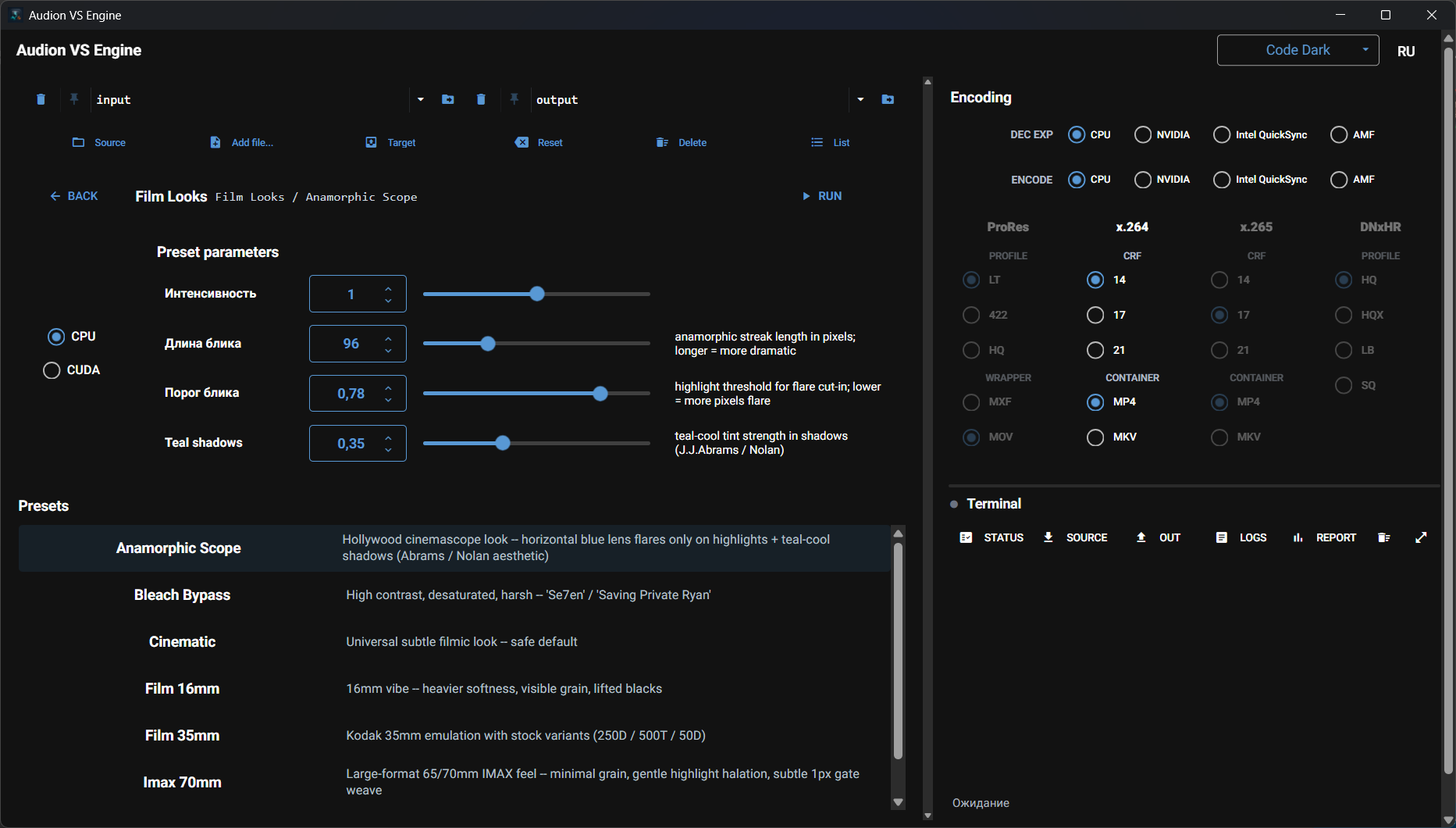
The same VS Engine when there is no expensive NVIDIA RTX on board. The recipes that need such a card are left out — part of the more elaborate retro-content work. Everything else works and runs just the same.
Audion VS Engine Lite
Contents
- Why It Exists
- Four Palettes
- The Principle
- Editions
- Next
- Technical Reference
- Before the First Run
- FFmpeg and the NVIDIA Driver
- Profiles
Technical video preparation and stylisation on VapourSynth and FFmpeg. Twenty-two presets across four independent palettes, without the neural layer.
Why It Exists
VapourSynth does what no editing suite offers out of the box: restoring film material, deinterlacing with a good algorithm, denoising that treats the shadows separately, neural upscaling. But using it means writing a Python script, remembering plugin names, and assembling a pipeline by hand for every clip.
This program turns that into a set of ready presets. The script stays under the hood: the engine assembles a vspipe | ffmpeg chain and runs it.
Four Palettes
They are independent: you can take the technical processing alone and never touch the stylisation, or the reverse.
| palette | presets | what it does |
|---|---|---|
| Precision | 8 | denoising, including shadow-targeted, debanding, controlled return of fine grain. The technical layer before the colourist |
| Film | 5 | film emulations: 35 mm Kodak, 16 mm, Super 8, bleach bypass, a general cinematic look |
| Retro | 2 | analogue character: VHS and CRT, a 1990s camcorder |
| Restoration | 7 | what editing suites lack: deinterlacing, inverse telecine, motion-compensated denoising, derainbow and deblocking, dehazing, plus non-neural upscaling |
Order matters. The precision palette is the technical layer that comes before colour grading: fixing noise after the colourist has lifted the shadows is too late.
The Principle
The engine is a Python orchestrator over vspipe | ffmpeg. It neither rewrites VapourSynth nor hides it: the assembled command is visible, and you can take it and run it by hand.
The launchers are ordinary batch files with a quick picker and a fallback menu, in Russian and English versions.
Editions
| edition | presets | difference |
|---|---|---|
| full | 28 | with the neural layer: upscaling, frame doubling, neural denoising |
| Lite | 22 | classic VapourSynth plugins, no neural stack |
This edition is lighter and needs no graphics card: everything runs on classic plugins.
Next
- User Guide — installing the engine, first run, palettes,
profiles, command line.
Technical Reference
Before the First Run
The VapourSynth engine and its plugins are installed separately — once. Until that is done, the presets will not run.
FFmpeg and the NVIDIA Driver
Every FFmpeg build is compiled against a particular version of the hardware-encoding headers and demands its own minimum driver. The newest build on an old driver does not accelerate anything — it breaks the hardware path. The build is chosen to match the driver.
Profiles
Saved combinations of presets and parameters — so the same chain need not be assembled twice.
The program is portable: the unpacked folder is the installed program. Nothing is written to the registry; to uninstall, delete the folder.
$name = "Audion_VS_Engine_Lite_v2.0.3_Full.zip"
Invoke-WebRequest "https://audion.dev/get/vs-engine-lite/2.0.3/Audion_VS_Engine_Lite_v2.0.3_Full.zip" -OutFile $name
Invoke-WebRequest "https://audion.dev/get/vs-engine-lite/2.0.3/Audion_VS_Engine_Lite_v2.0.3_Full.zip.sha256" -OutFile "$name.sha256"
$want = (Get-Content "$name.sha256").Split(" ")[0]
$have = (Get-FileHash $name -Algorithm SHA256).Hash.ToLower()
if ($want -ne $have) { throw "checksum mismatch: the download is corrupt" }
Expand-Archive $name -DestinationPath ".\vs-engine-lite"